For contractors on GePNIC & state e-procurement portals

The winning number was always public.
Now it’s in your hand.

Every financial evaluation ends in a comparative statement — who bid, who came L1, and how far below the estimate the winner landed. BOQ+ reads those published results and shows you the discount band that actually wins, item by item, while you fill your BOQ on your phone.

Android & iOSGePNIC + state portalsNo card for the free tier

The 11 o’clock problem

You walked the site this morning — measured the approach, argued about lead distances, noted the soft patch no estimate ever mentions. Now the house is quiet, the tea has gone cold twice, and a hundred BOQ items are waiting for rates. Meanwhile the answer key exists: departments publish comparative statements after every award — L1, L2, the exact % below estimate that won. It just was never worth the nights it took to read them, portal by portal, PDF by PDF. So that’s the part we do.

here’s that part, counted:
45,584
comparative statements read
₹14,277 Cr
of decided tender value covered
3.5
average bidders per tender
9.2%
median winning discount, below estimate

All four figures are read straight off the Market Report capture further down this page — we’d rather show you the screen than round you a number.

inside the app

The published record, arranged for a working evening.

Bare screens from the app itself — no dressing up. Where a screen shows sample data, the caption says so.

Fill your BOQ where you actually are.

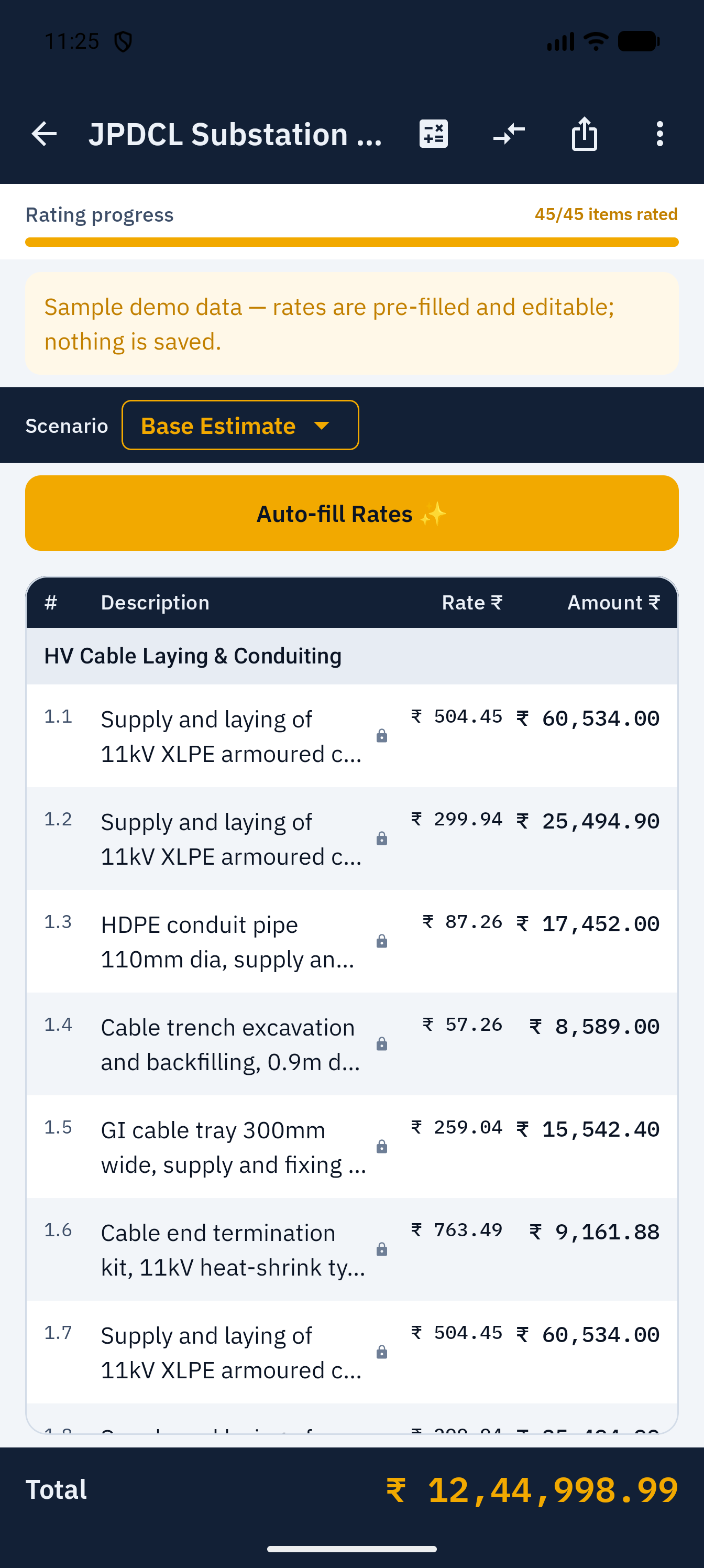
Enter rates item by item on your phone — at the kitchen table, in the car outside the department office, wherever the evening finds you. No laptop, no portal timeouts, no retyping from a paper printout.

And every item carries its intelligence one tap away, so you’re never pricing blind.

BOQ+ rate-filling screen with a list of BOQ items and rate entry fields
Rate-filling screen — sample data shown.
the band that actually wins — from published results
BidIQ per-item intelligence screen showing winning discount information for a BOQ item
BidIQ item intelligence — sample data shown.

BidIQ — for every item, the number that won last time.

For each BOQ item, BidIQ shows the winning discount band drawn from real comparative statements: how far below the estimated cost the winning rates actually landed. Not a rule of thumb passed around the site office — the published record, sorted so you can use it at speed.

See the whole market before you commit a rate.

The Market Intelligence Report lays out winning discounts as a histogram — where bids cluster, where the median sits, where the outliers went to die. The capture here reads 45,584 comparatives covering ₹14,277 crore of decided work, with the median winning bid at 9.2% below estimate.

Estimates start from CPWD DSR or MES SSR; the market decides what wins. Now you can see the market before it sees you.

where the winners cluster
Market Intelligence Report with a histogram of winning discounts, 45,584 comparatives, and a median of 9.2% below estimate
Market Intelligence Report — actual app screen.
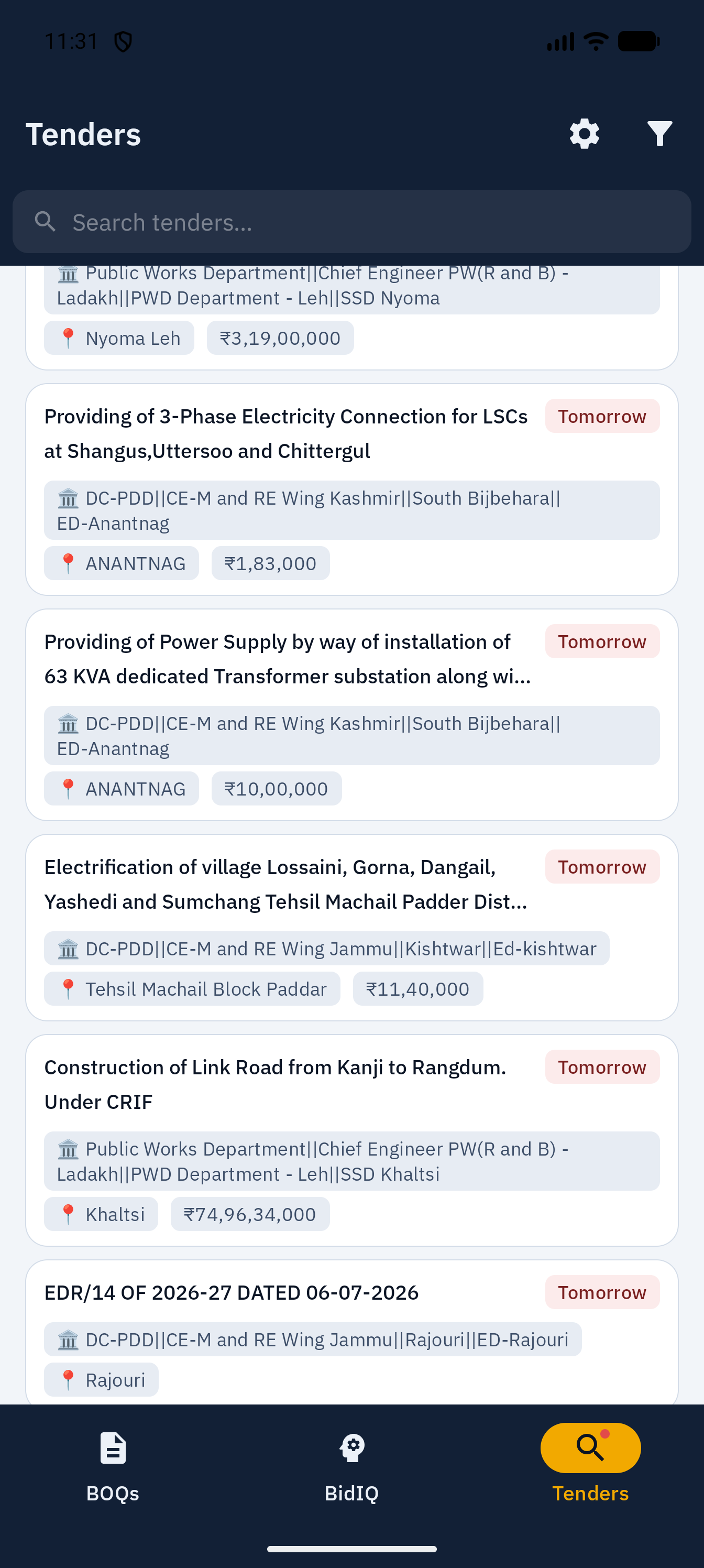
Live tenders list in BOQ+
Tender detail sheet showing dates, value and EMD
Tenders list and detail sheet — actual app screens.

Live tenders, without wrestling the portal.

Browse live tenders in a clean list, open a detail sheet with the dates, values and EMD in one place, and shortlist the ones worth your evening.

The portal is where you submit. This is where you decide.

Your bids, remembered honestly.

My Track Record keeps your bidding history in one place — what you bid, at what % below estimate, and how it went — so next season’s pricing starts from your own experience instead of a fresh guess.

It starts empty, like the one shown here. It fills with your work, and only your work.

My Track Record screen in its empty starting state
My Track Record — product mockup, shown in a new account’s empty state.

how it compounds

It gets sharper the more you bid.

BOQ+ is built around one loop, and it’s the first thing the app shows you:

  1. 1Track tenders worth your time, with dates, values and EMD in one sheet.
  2. 2Fill your BOQ with BidIQ’s winning bands beside every item.
  3. 3Record the outcome when the comparative statement is published.
  4. 4Bid sharper next time — your track record and the market report carry the lesson forward.
BOQ+ onboarding screen showing the track, fill, record, improve flywheel
Onboarding — actual app screen.
straight talk

What you won’t find on this page.

Four things we left out on purpose.

left out, on purpose
  • No testimonials. We don’t have real ones yet. When a contractor says something kind and lets us print it, it’ll appear here — and not a day sooner.
  • No invented numbers. A “tenders indexed” ticker we can’t stand behind is a number you shouldn’t have to squint at. Every figure on this page is read off an actual screen.
  • No countdowns, no “3 spots left”. The only deadline in your week should be the submission deadline. The founding price simply ends when the first 100 seats are taken.
  • No staged mockups. The screenshots are bare phone captures, status bars and all. Where one shows sample data, its caption says so.

An app built to read the record straight shouldn’t bend it on its own website.

what it costs

Priced like a tool you keep in the van.

Start free, no card. Pay only when it’s earning its keep.

Free
₹0

Your first 2 BOQs, on us. No card needed.

Start free
Quarterly
₹3,999 / quarter

Three months of BOQ+, season by season.

Choose quarterly
Credits
₹999 / 5 BOQs

For the occasional bidder.Credits expire 12 months after purchase.

Buy credits

Same figures as the in-app paywall, fine print included — no asterisks to hunt for.

The next comparative statement will be published either way.
Be on the right line of it.

Two BOQs free to start — no card, no commitment. Just your next bid, priced with the record open.

Store listings are on their way — the links above go live with launch.